Private, voice-guided heart-rate coaching
Stay in your zone without staring at your phone.
Choose Run or Walk, Indoor or Outdoor, then let short English cues keep you near your target heart-rate zone.
Choose an Outdoor or Indoor Run or Walk, select your target heart-rate zone, and start moving. HeartZone Coach speaks short English cues as your effort changes, shows live workout metrics, and keeps completed workouts in private local History on your iPhone.
- iPhone · Requires iOS 26
- No account required
- Run or Walk, Indoor or Outdoor
- Five target zones
- Works with Apple Health
- No account
- No ads
- No analytics
- Stored on your iPhone.
- No third-party tracking
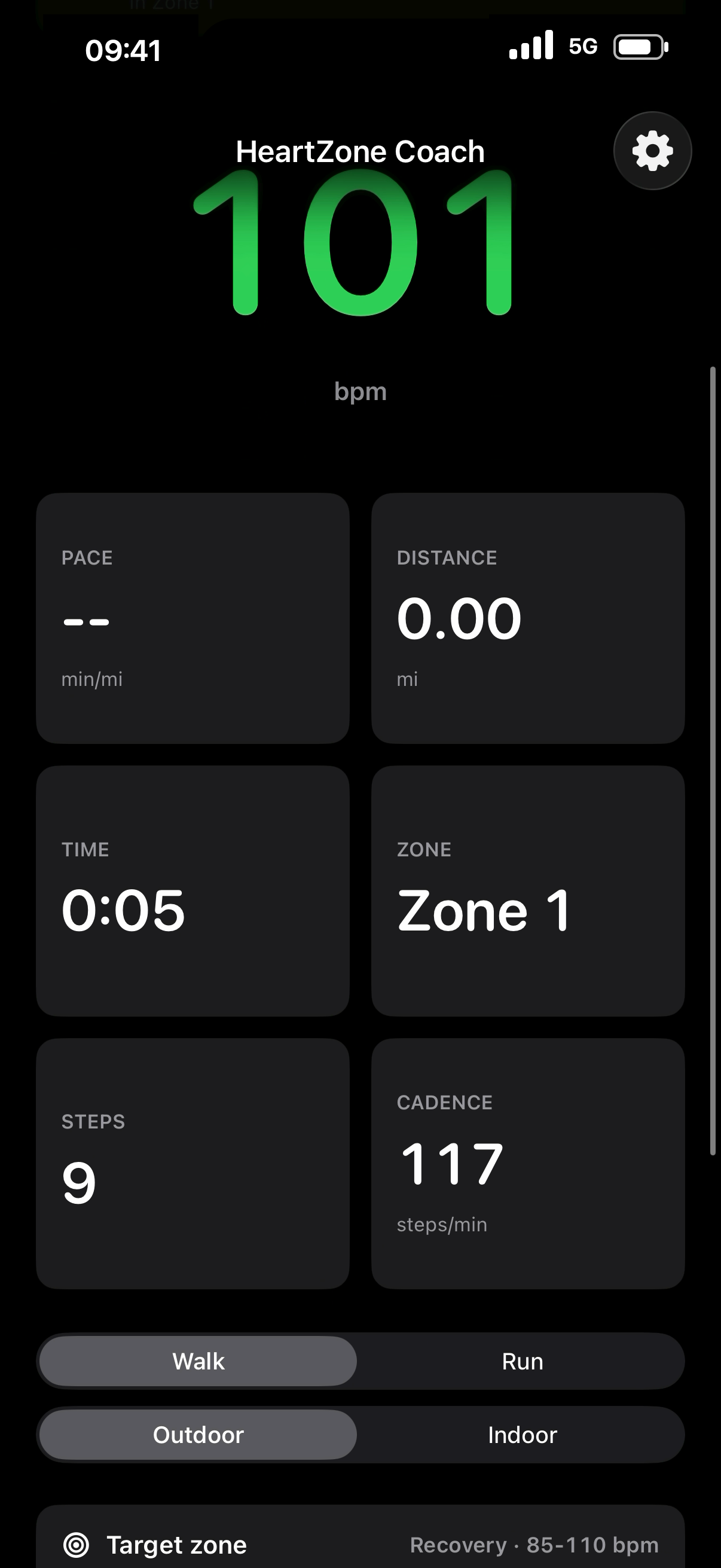
Choose your workout
Run or walk, indoors or out, in the zone you picked
Zone training works best when you stay close to the zone you chose. Set the workout before you start, then change your mind mid-session without losing what you have already recorded.
Set it once, adjust it anywhere
- Run or Walk, Outdoor or Indoor. Four combinations, each handled differently by the app.
- Five selectable target zones. Start from age-based defaults, or set your own maximum heart rate and zone boundaries.
- Switch on the fly. Walk/Run, Indoor/Outdoor, and the target zone can all change during a workout without restarting the session.
- A ready check before you go. See heart-rate source, motion, and Health status before the first step.
Distance units follow your choice of Miles, Kilometers, or Automatic. The screenshots on this page use Miles.
Coaching without screen-watching
Short cues that stay with your workout
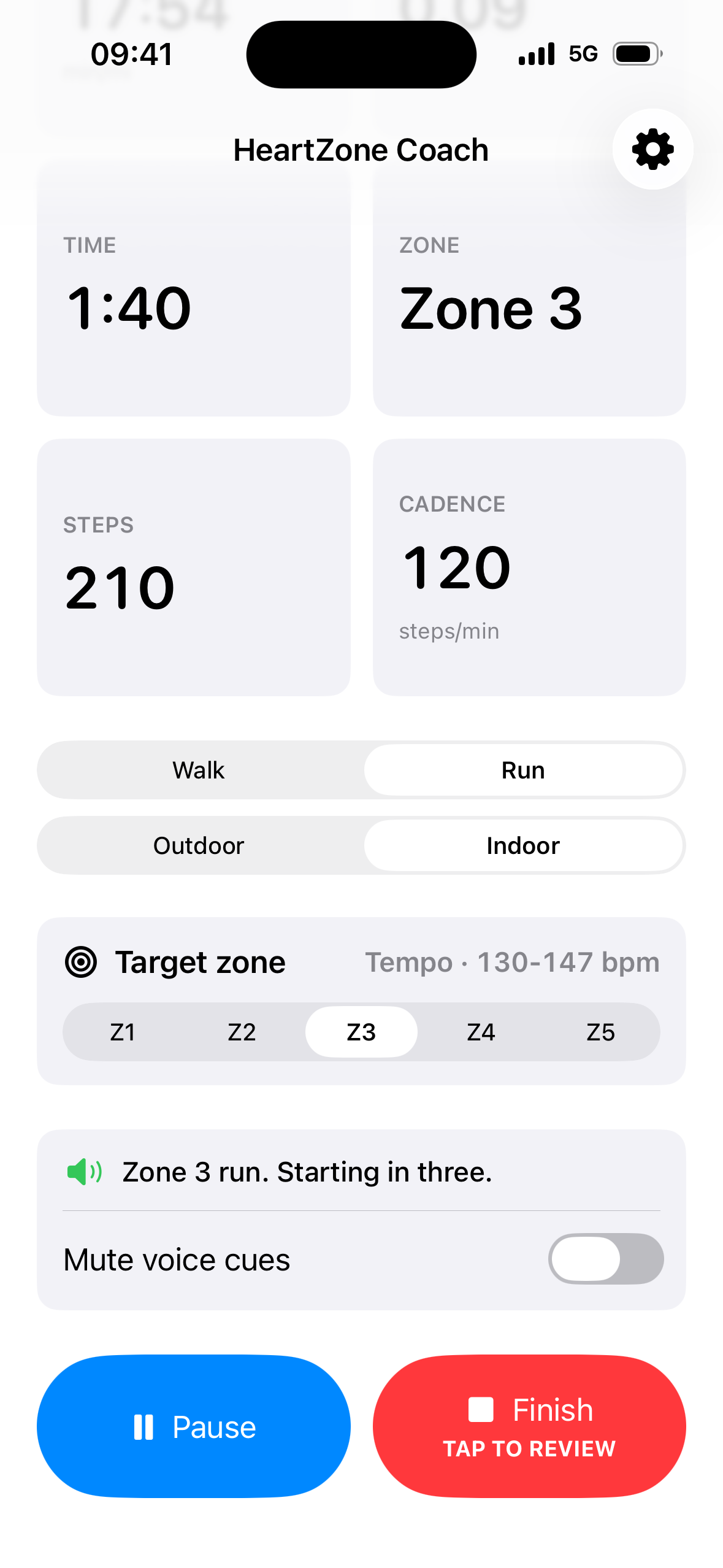
Pick how much the app talks. Cues are short, in English, and continue during an active workout when you return to the Home Screen or lock your iPhone.
Two coaching styles, three sensitivities
- Full coaching adds periodic spoken updates with your choice of heart rate, zone, pace, distance, and time.
- Zone changes only limits speech to leaving or re-entering your target zone.
- Responsive, Balanced, or Quiet sensitivity, adjustable speech speed, and customizable zone-change phrases.
- Background coaching keeps active-workout cues going on the Home Screen and Lock Screen.
- Mute mid-workout from the active screen when you want silence.
Coaching cues are spoken in English and designed to play alongside music and podcasts. Live zone coaching requires a compatible heart-rate source that records to Apple Health; cues also depend on your settings, mute state, and audio output.
Designed to feel native
Light or Dark. Always at home on iPhone.
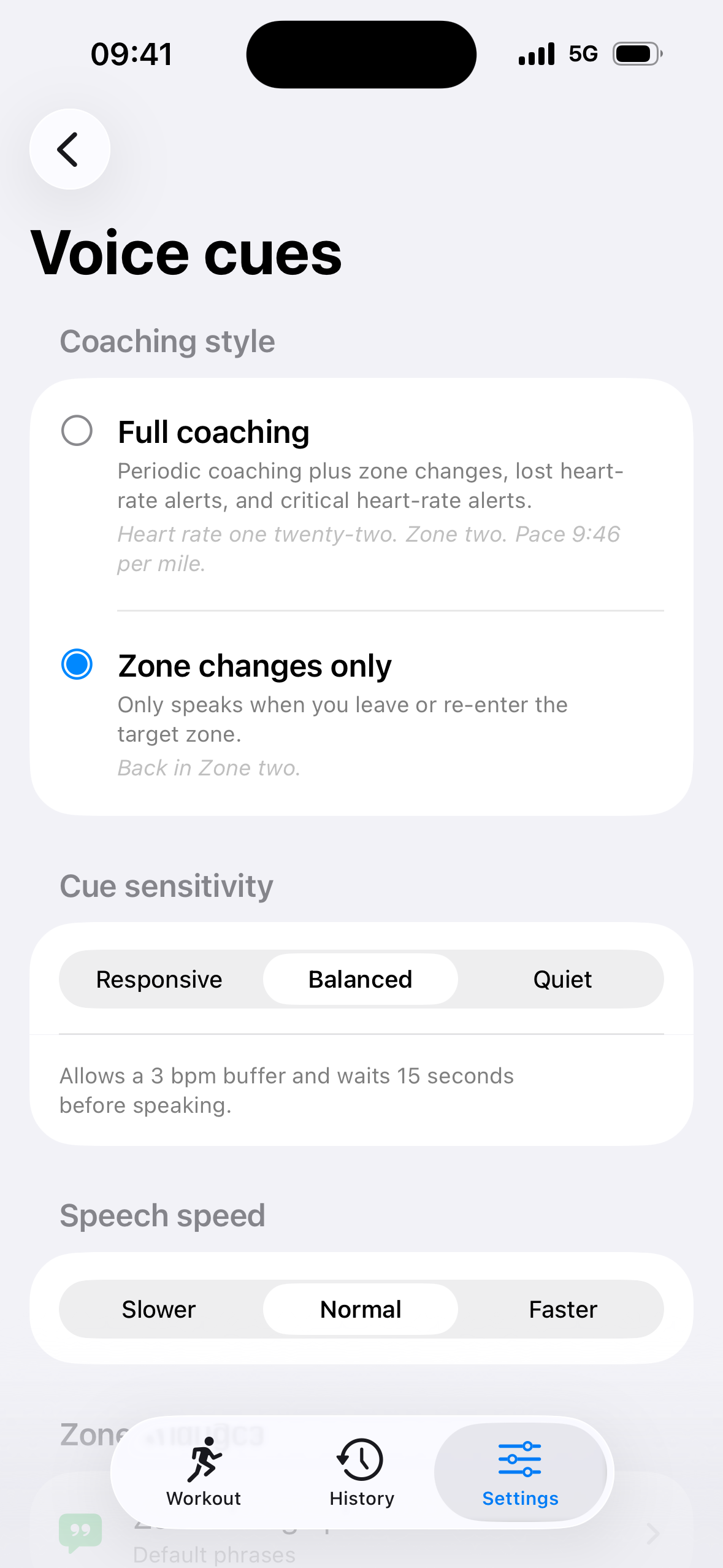
HeartZone Coach automatically matches your iPhone’s appearance, so every workout feels familiar from the first tap.
Made for every light
- Effortless appearance. Light and Dark follow your iPhone automatically.
- Clear at a glance. High-contrast metrics stay easy to read indoors, outdoors, day or night.
- One consistent experience. Controls and coaching stay familiar in either appearance.
See HeartZone Coach in Light and Dark, shown with Miles selected.
Glanceable everywhere
One tap from the Home Screen
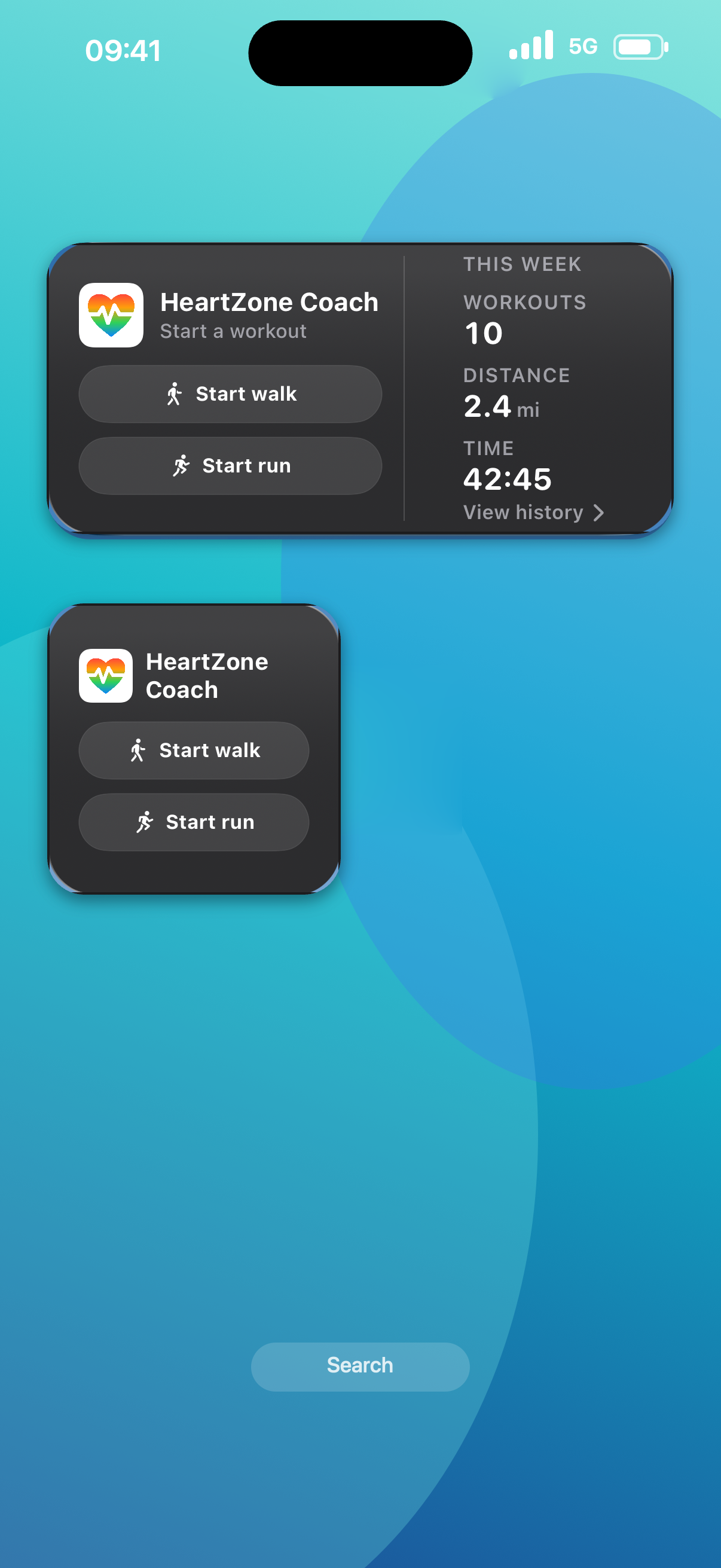
Home Screen and Lock Screen widgets keep the next workout close, with separate Start walk and Start run actions and a weekly summary of workouts, distance, and time.
- Small and Medium widgets with separate Walk and Run starts.
- A user-initiated Live Activity with Dynamic Island support on supported iPhones.
- Zone status at a glance from the Lock Screen: heart rate, elapsed time, and pace.
Widget appearance follows the system. Shown here in the regular full-color style with the current app icon.
Understand the result
A record that tells you whether the session worked
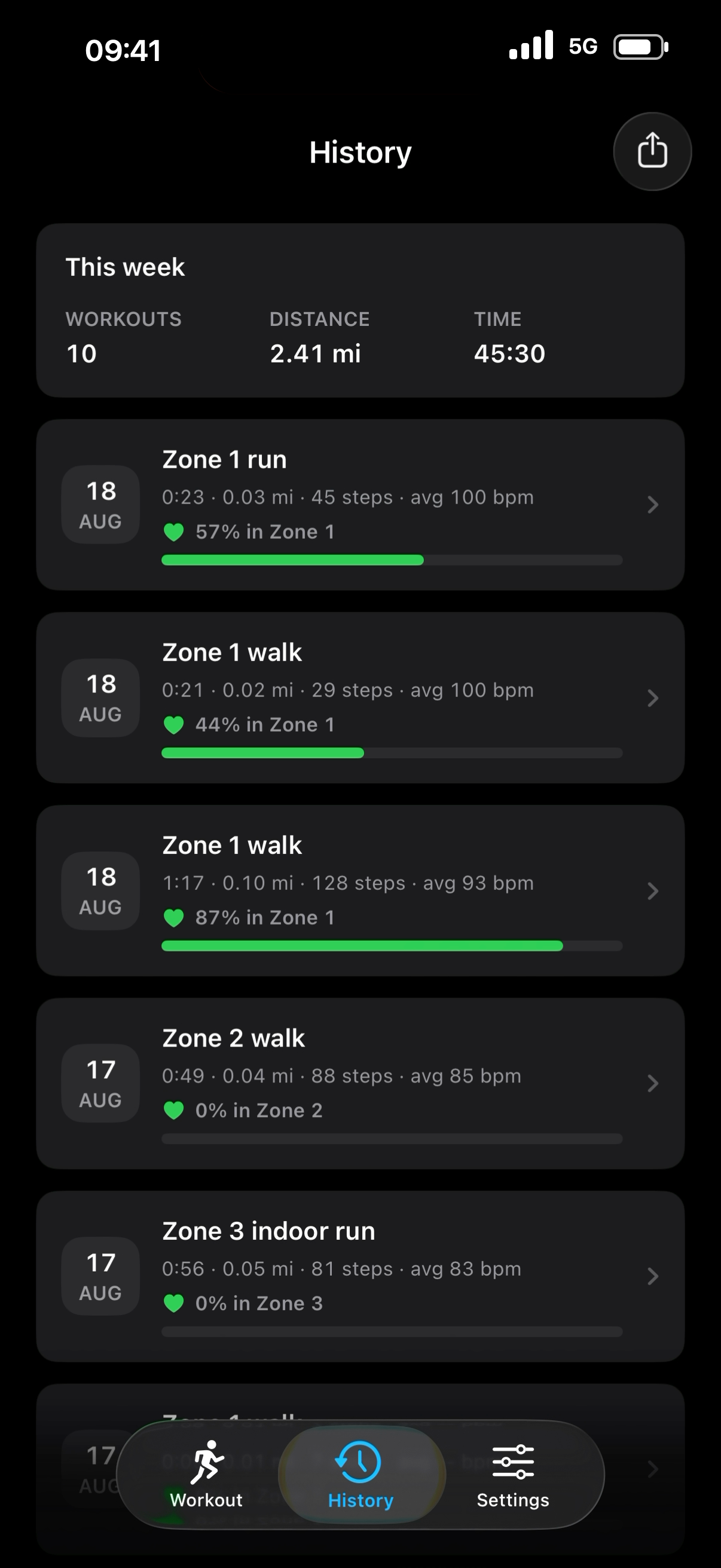
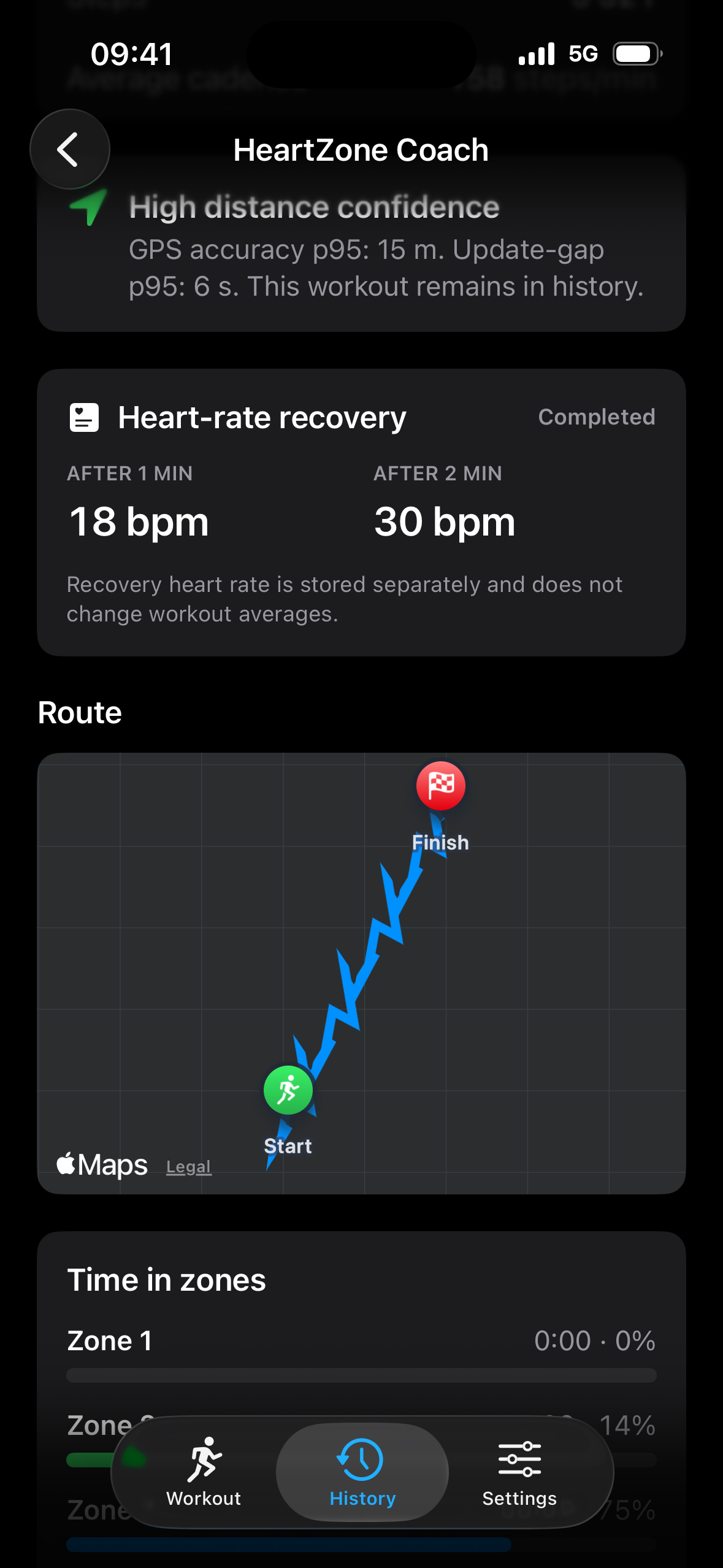
Finished workouts land in local History with a weekly overview, then open into the detail: distance, moving and total time, average pace, average and maximum heart rate, steps, cadence, time in zones, and a heart-rate chart.
Outdoor and indoor, kept distinct
- Outdoor workouts track pace and distance with GPS and show the route you completed when usable location data is available.
- Indoor workouts keep GPS and route recording off while your iPhone tracks steps, cadence, and estimated distance.
- Heart-rate recovery is measured after the workout and stored separately, so it does not change your workout averages.
- Time in every zone shows where the effort actually went, not just where you aimed it.
Indoor steps, cadence, and distance are estimates from iPhone motion and may differ from treadmill readings. Route maps appear when usable GPS data is available; accuracy varies with conditions.
Privacy by design
Your workouts stay on your iPhone
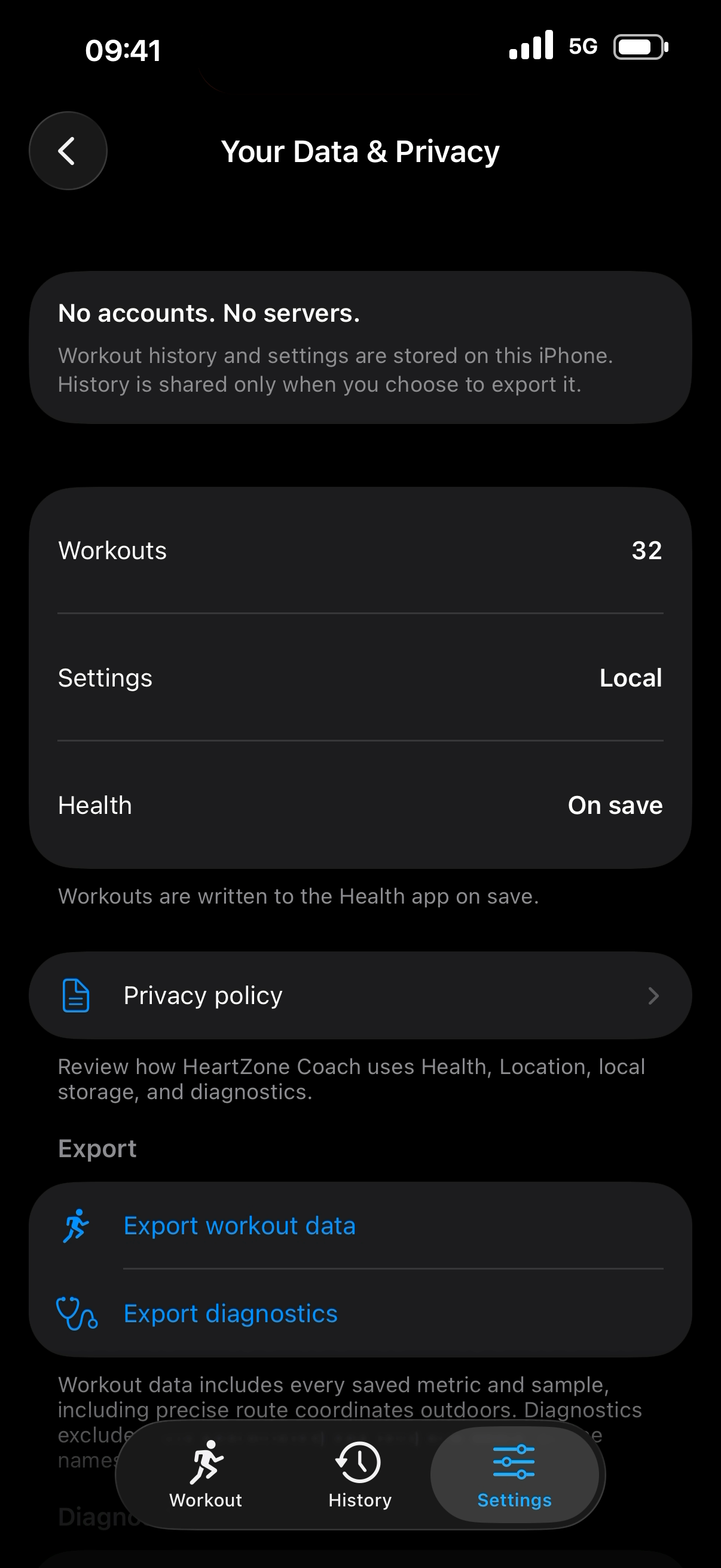
Start right away—no account required. Your workout history stays on your iPhone and leaves only when you choose to export it or save it to Apple Health.
- No account, no sign-in, no subscriptions or in-app purchases.
- No advertising, no analytics SDKs, no third-party tracking.
- Workout history, route coordinates, preferences, and diagnostics are stored locally in the app's container on your iPhone.
- Location is used only during an active Outdoor workout — the app requests While Using access, not Always.
- Completed workouts are written to Apple Health only with your permission.
- Export is user-triggered: you choose when to write a JSON file and where to send it. You can delete local history and diagnostics from Settings.
Fitness guidance, not medical advice. HeartZone Coach is a fitness coaching tool, not a medical device. It does not provide diagnosis, treatment, or medical advice, and it is not intended for emergency or clinical monitoring.
How it works
Choose, move, review
- 01
Choose
Pick Run or Walk, Outdoor or Indoor, and one of five target heart-rate zones. Zone boundaries start from age-based defaults and stay editable.
- 02
Move
Follow live metrics in the app, or return Home and lock your iPhone while active-workout cues tell you when your effort leaves or re-enters the zone.
- 03
Review
Finish with confirmation. The workout is saved to local History with time in zones and recovery, and to Apple Health if you allowed it.
Permissions explained
Three permissions, each tied to something you can see
Every permission maps to a feature that runs while you are working out. None of them powers advertising or tracking.
Health
Reads heart rate from compatible HealthKit sources during an active workout, and writes completed workouts to Apple Health when you allow it.
For live zone coaching, use a compatible heart-rate source that records to Apple Health.
Location — While Using
Provides GPS pace, distance, and the saved route for Outdoor workouts. The app requests While Using access, not Always.
Route maps appear when usable GPS data is available; accuracy varies with conditions.
Motion & Fitness
Provides steps, cadence, and estimated distance for Indoor workouts using the iPhone pedometer.
Indoor steps, cadence, and distance are estimates from iPhone motion and may differ from treadmill readings.
FAQ
Questions worth answering before you download
Which heart-rate sources work with the app?
Any source that records heart rate to Apple Health and is compatible with HealthKit. HeartZone Coach reads those samples during an active workout. Readings may be unavailable or delayed depending on the source, and the app does not claim direct integration with any specific wearable.
Do voice cues work on the Home Screen or Lock Screen?
Yes, during a user-started active workout. Cues can continue after you return to the Home Screen or lock your iPhone. They still depend on available heart-rate data, your coaching settings and mute state, and the selected audio output. Spoken coaching ends when you finish or cancel the workout.
How is indoor distance measured?
Indoor workouts use the iPhone pedometer for steps, cadence, and estimated distance, with GPS and route recording off. The figures are estimates and may differ from a treadmill display. Carry your iPhone where it moves naturally with your stride.
Do outdoor workouts save a route?
Yes, when usable outdoor GPS data was recorded. Outdoor workouts also use GPS for pace and distance. A route map appears in the workout detail only if the recorded location data is good enough to draw one.
Can I get my data out?
Yes. Export is user-triggered: you choose when to write a JSON file of your workout data and where to send it. Diagnostics can be exported separately and exclude raw route coordinates and motion samples.
Does it save to Apple Health?
Completed Run and Walk workouts are written to Apple Health when you grant permission, and you can decline. Removing a workout inside HeartZone Coach does not remove a copy already saved in Apple Health.
Is this a medical or heart-monitoring app?
No. HeartZone Coach is a fitness coaching tool, not a medical device. It does not provide diagnosis, treatment, or medical advice, and it is not intended for emergency or clinical monitoring.
Which devices are supported?
Requires iOS 26 on iPhone. There is no iPad, Mac, Android, or Apple Watch app. Live Activity appears in the Dynamic Island on supported iPhones.
Available now on the App Store
Download HeartZone Coach free on iPhone. Requires iOS 26.